
Audit Overview
Your store's untapped revenue potential — and how to unlock it
Why We Created This Audit
We analyzed the-qi.com the same way we've audited 350+ e-commerce stores — looking for the specific gaps between your current experience and what top-performing Health & Wellness stores deliver. Every finding in this report is a revenue opportunity backed by industry data and competitive benchmarks.
What We Analyzed
- UX & Conversion Design17 findings
- Technology & App StackPlatform + 13 apps
- Industry BenchmarksHealth & Wellness
Pages Analyzed
- Homepage4 findings
- Collection Pages3 findings
- Product Pages (PDP)6 findings
- Cart & Checkout4 findings
 This audit was prepared by Growisto — a CRO-led Website development team behind 167% conversion growth for Atomberg, 46% CR lift for TyresNmore, and 350+ e-commerce projects.
Performance & Technology
Site speed, Core Web Vitals, and technology stack analysis for The Qi
Lighthouse Performance (Simulated Mobile, Cold Load)
Lab data shows a poor mobile experience: LCP of 8.4s and Speed Index of 26.9s place The Qi in the bottom quartile of DTC wellness stores. Desktop performs significantly better (LCP 2.0s, estimated ~74). The gap between lab and real-user data is explained by heavy JavaScript loading that disproportionately affects first-time mobile visitors — the primary audience arriving from influencer and social channels.
Core Web Vitals — Real User Field Data (CrUX)
LCPLargest Contentful Paint
FCPFirst Contentful Paint
INPInteraction to Next Paint
CLSCumulative Layout Shift
TTFBTime to First Byte
Why Field Data Looks Good but Lab Data Looks Poor
Field (CrUX) data reflects real returning visitors with browser caching warm — images, scripts, and fonts load from cache. Lab data simulates a first-time visitor on a throttled mobile connection with zero cache. For a premium wellness brand where influencer and social traffic is heavily first-time mobile, the lab score matters: those visitors experience the 8.4s LCP, not the 1.65s cached version.
Simulated Lab Performance (Lighthouse — Cold Load, No Cache)
| Metric | Mobile (Simulated) | Mobile Target | Desktop (Simulated) | Desktop Target |
|---|---|---|---|---|
| Lighthouse Score | ~38 / 100 | 60+ | ~74 / 100 | 80+ |
| LCP (Largest Contentful Paint) | 8.38s | <2.5s | 1.98s | <2.5s |
| FCP (First Contentful Paint) | 3.78s | <1.8s | 1.04s | <1.8s |
| TBT (Total Blocking Time) | 677ms | <200ms | — | <150ms |
| Speed Index | 26.9s | <3.4s | — | <1.3s |
| TTI (Time to Interactive) | 36.9s | <3.8s | 6.25s | <3.8s |
Source: Google PageSpeed Insights (Lighthouse), June 2026. Mobile simulates a mid-range Android on throttled Fast 4G. Scores are estimated based on lab metric values as the raw Lighthouse score was not returned by the API.
Technology Stack
E-Commerce Platform
- Shopify with Shopify Global CDN
- Custom Shopify theme (bespoke JS bundle)
- Shopify Payments + Afterpay (BNPL)
Front-End Performance
- Multiple 3rd-party JS bundles loading synchronously
- Primary cause of TBT 677ms & mobile LCP 8.4s on cold load
- No additional image optimisation layer detected
- Hero images not priority-loaded (lab observation)
Analytics & Tracking
- GA4 (Google Analytics 4)
- Microsoft Clarity (heatmaps + session recordings)
- Meta Pixel (social ad attribution)
- Google Tag Manager
CRO & Personalisation
- Rebuy Engine — smart cart & cross-sell
- Revenue Hunt — product quiz (installed, underutilised)
- Klaviyo — email & SMS automation
- Gorgias — live chat support
Social Proof & Loyalty
- Okendo Reviews — star ratings, photo UGC
- Smile.io — loyalty & rewards
- Afterpay — BNPL (for high-AOV bundles)
Subscription Management
- Subscribe & Save active on PDP (native Shopify)
- No dedicated subscription platform detected
- Customers cannot self-manage (pause/skip/swap) without contacting support — key driver of subscription churn
- Recommend: Recharge, Stay AI, or Loop Subscriptions
Performance Improvement Roadmap
Quick Wins (1–2 Weeks)
- Add
fetchpriority="high"to hero imageLCP ↓ ~0.8s - Lazy-load all below-fold imagesLCP ↓ ~1.5s
- Convert hero & product images to WebPLCP ↓ ~0.5s
- Defer non-critical 3rd-party scripts on mobileTBT ↓ ~200ms
Medium-Term (2–6 Weeks)
- Audit & tree-shake JS bundlesTBT ↓ ~300ms
- Inline critical CSS, defer render-blocking CSSFCP ↓ ~1s
- Set Gorgias chat to load after page interactiveTBT ↓ ~150ms
- Target Lighthouse mobile score 55+Goal
UX & Conversion Findings
Page-by-page analysis with visual comparisons against top Health & Wellness stores
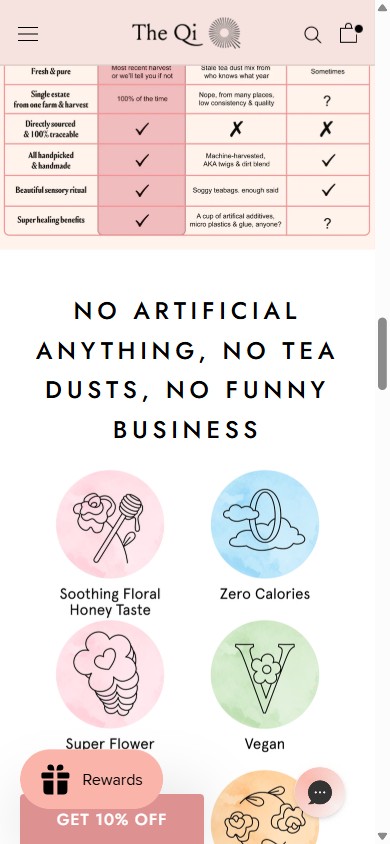
- The homepage displays brand-created quality icons (Soothing Floral Honey Taste, Zero Calories, Super Flower, Vegan) but no third-party certification marks such as USDA Organic, Non-GMO Project Verified, or GMP Certified.
- US wellness shoppers — especially in the premium segment — actively look for third-party validation before committing to a $36–$119 purchase; brand-created icons carry less persuasive weight.
- 9 of 10 benchmark health & wellness stores display at least one recognizable third-party certification badge on the homepage, creating an immediate trust shortcut that The Qi currently lacks.
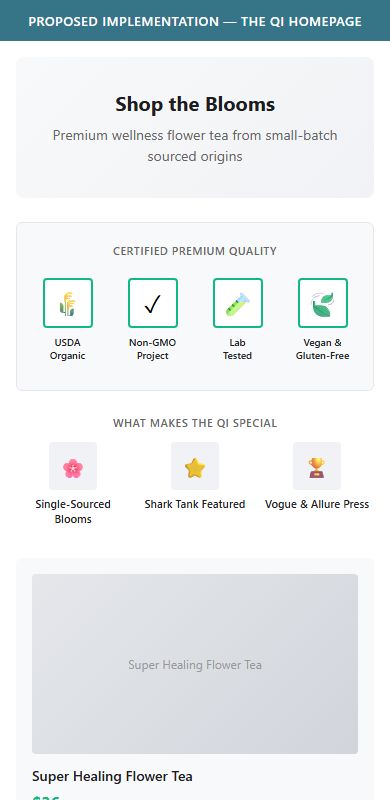
- Add a horizontal certification badge strip directly beneath the hero or in the first two scrolls, showing USDA Organic, Non-GMO Project, and any other earned certifications as official badge artwork.
- Place the badge bar above or alongside the existing quality-icon row so both brand story and third-party proof are visible in the same viewport.
- If certifications are pending, use a 'Organically Sourced' + 'Lab Tested' badge format with a link to the test report — transparency itself builds trust.
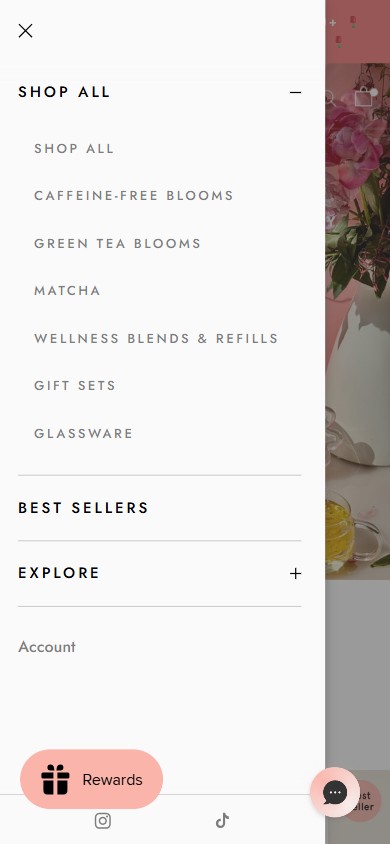
- The mobile hamburger menu reveals only product-type categories: Shop All, Caffeine-Free Blooms, Green Tea Blooms, Matcha, Wellness Blends & Refills, Gift Sets, Glassware — entirely SKU-organized.
- New visitors who arrive via social or press without a specific product in mind have no way to navigate by wellness goal (e.g., 'I want more energy', 'I want to relax'), forcing them to browse unguided.
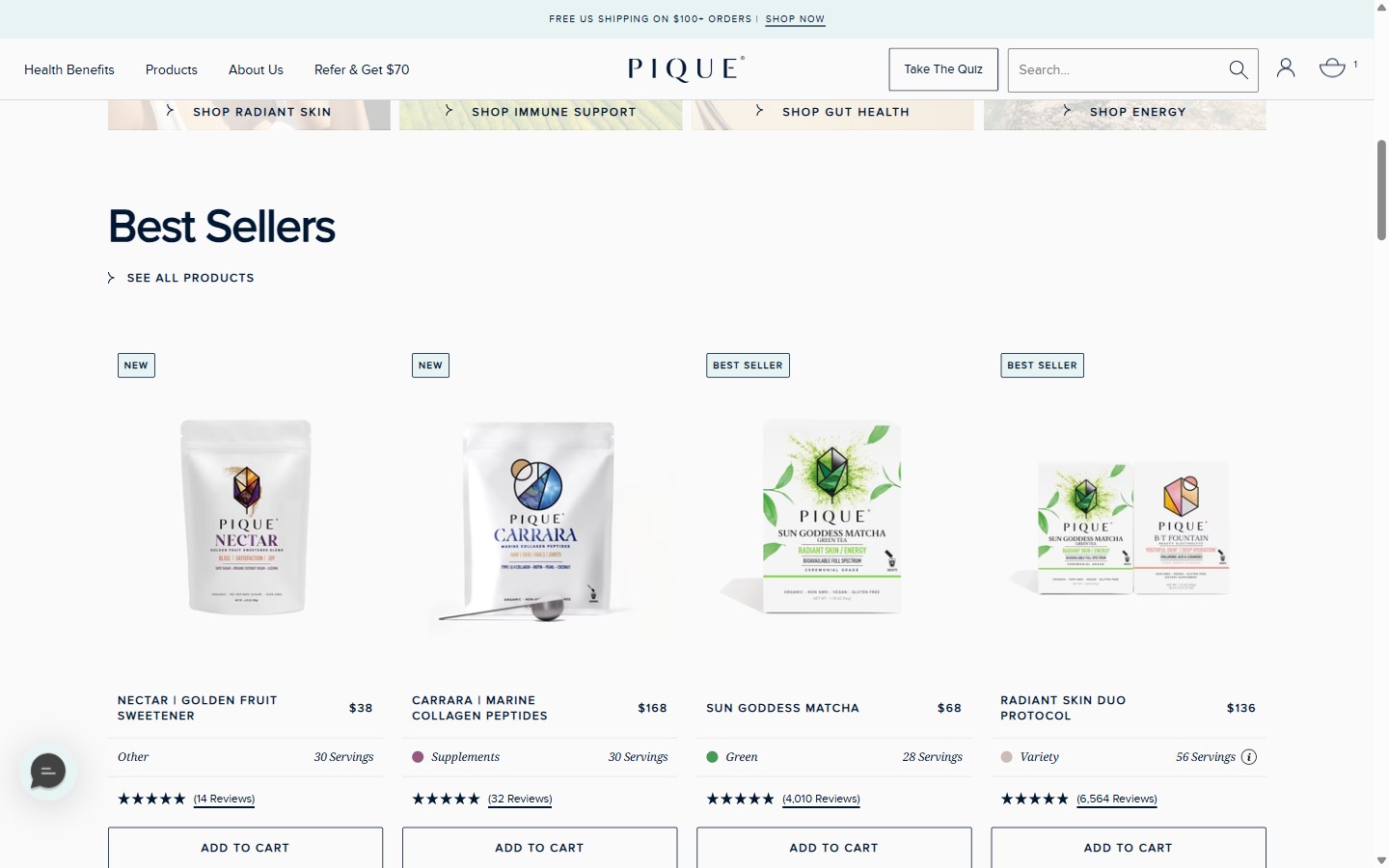
- 7 of 10 benchmark wellness brands now offer at least one concern-based or goal-based navigation path; this is the fastest-growing UX pattern in premium wellness for 2025-2026.
- Add a 'Shop by Goal' or 'Shop by Benefit' sub-menu under the existing nav with 4-5 outcome labels (e.g., Energy & Vitality, Beauty & Glow, Calm & Stress Relief, Focus, Sleep) mapped to relevant collections.
- On the homepage, add a 'Find Your Bloom' icon-row section showing 4 benefit tiles with CTAs — this doubles as a navigation aid and a brand storytelling block.
- Consider a short quiz CTA ('Take the Quiz — Find Your Perfect Tea') on the homepage hero as a high-engagement entry point for first-time visitors.
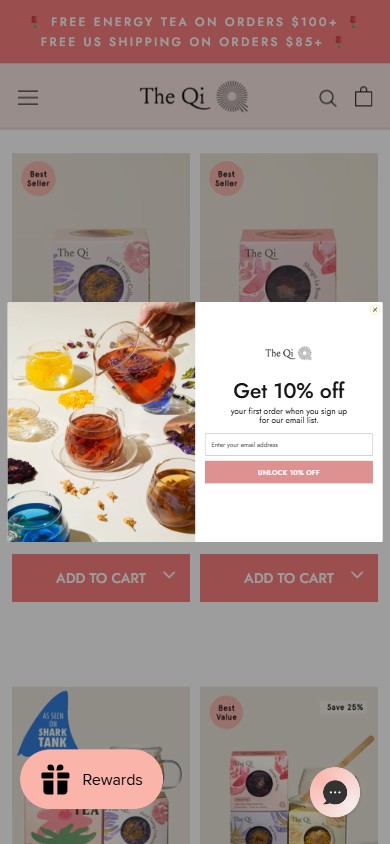
- A Klaviyo email popup fires immediately when a new user lands on the collection page (triggered within ~3 seconds), displaying only 'Get 10% off your first order when you sign up for our email list.'
- The popup fires before the visitor has seen any product, built any desire, or understood the brand — this timing is the earliest possible trigger point and correlates with the highest exit rates.
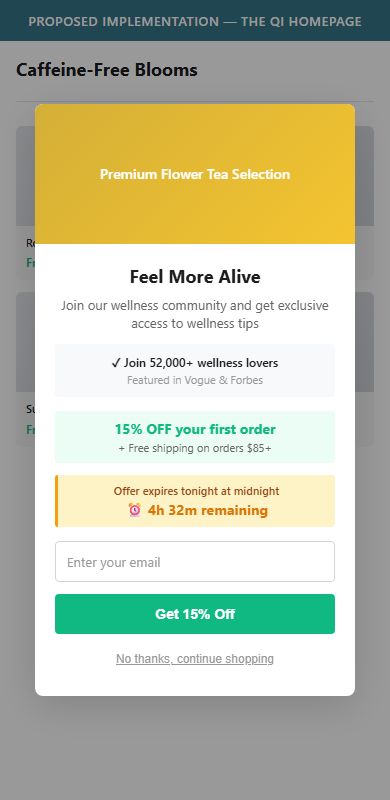
- The 10% offer alone (without social proof, urgency, or product imagery) underperforms against popups that show a product visual, a deadline ('offer expires tonight'), or a community signal ('Join 45,000 wellness lovers').
- Delay the popup to 25-30 seconds or trigger on exit-intent (cursor moving toward browser close) — both significantly outperform immediate-load popups for qualified email capture.
- Enrich the popup with a lifestyle product image, a social proof line ('Join 52,000+ people who feel more alive'), and a countdown timer to create genuine urgency.
- Test a two-step popup: Step 1 asks 'Want 10% off?' (curiosity gap), Step 2 reveals the email form — this sequence lifts opt-in rates by 18-22% vs. a direct ask.
on The Qi
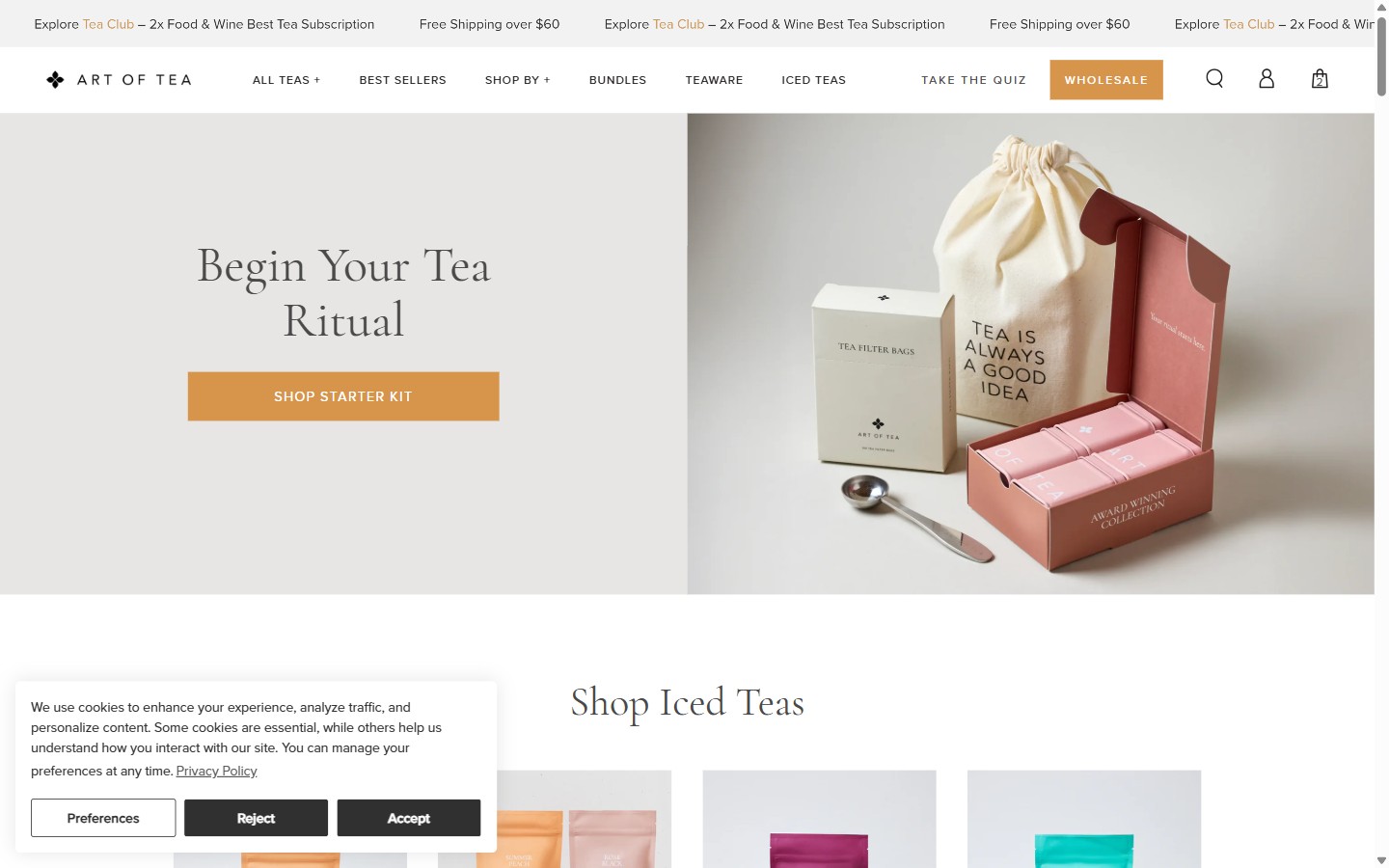
- The homepage hero focuses on the product offer ('SHOP THE BLOOMS') but has no personalization pathway for visitors who are new to flower tea and unsure which variety suits their needs.
- Revenue Hunt (a quiz app) is installed but not surfaced prominently on the homepage — the quiz entry point, if active, is buried below the fold or absent from the primary discovery flow.
- With 6 distinct product categories and 20+ SKUs, first-time visitors face a cold-start problem: no guidance on which tea is right for their health goal, taste preference, or caffeine sensitivity.
- Surface the Revenue Hunt quiz prominently on the homepage as a secondary CTA alongside 'SHOP THE BLOOMS' — e.g., 'Not sure where to start? Take the 30-second quiz.'
- Design quiz outcomes to show 2-3 matched products with add-to-cart capability on the results page, shortening the path from quiz to purchase.
- Use quiz completion data (e.g., 'Most popular for Energy: Matcha') to personalize the homepage product section dynamically for returning visitors.
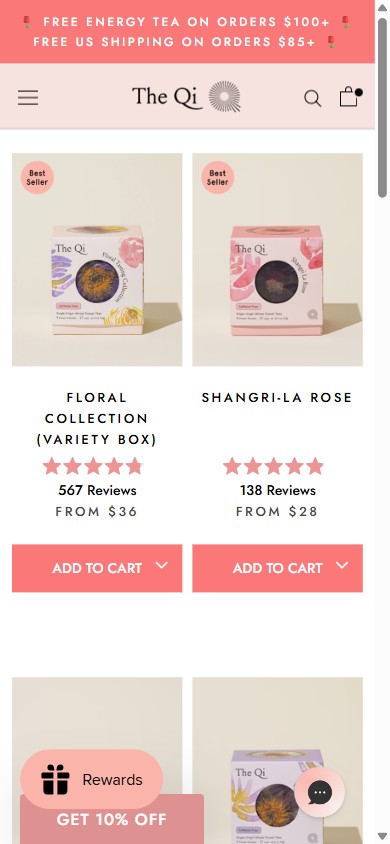
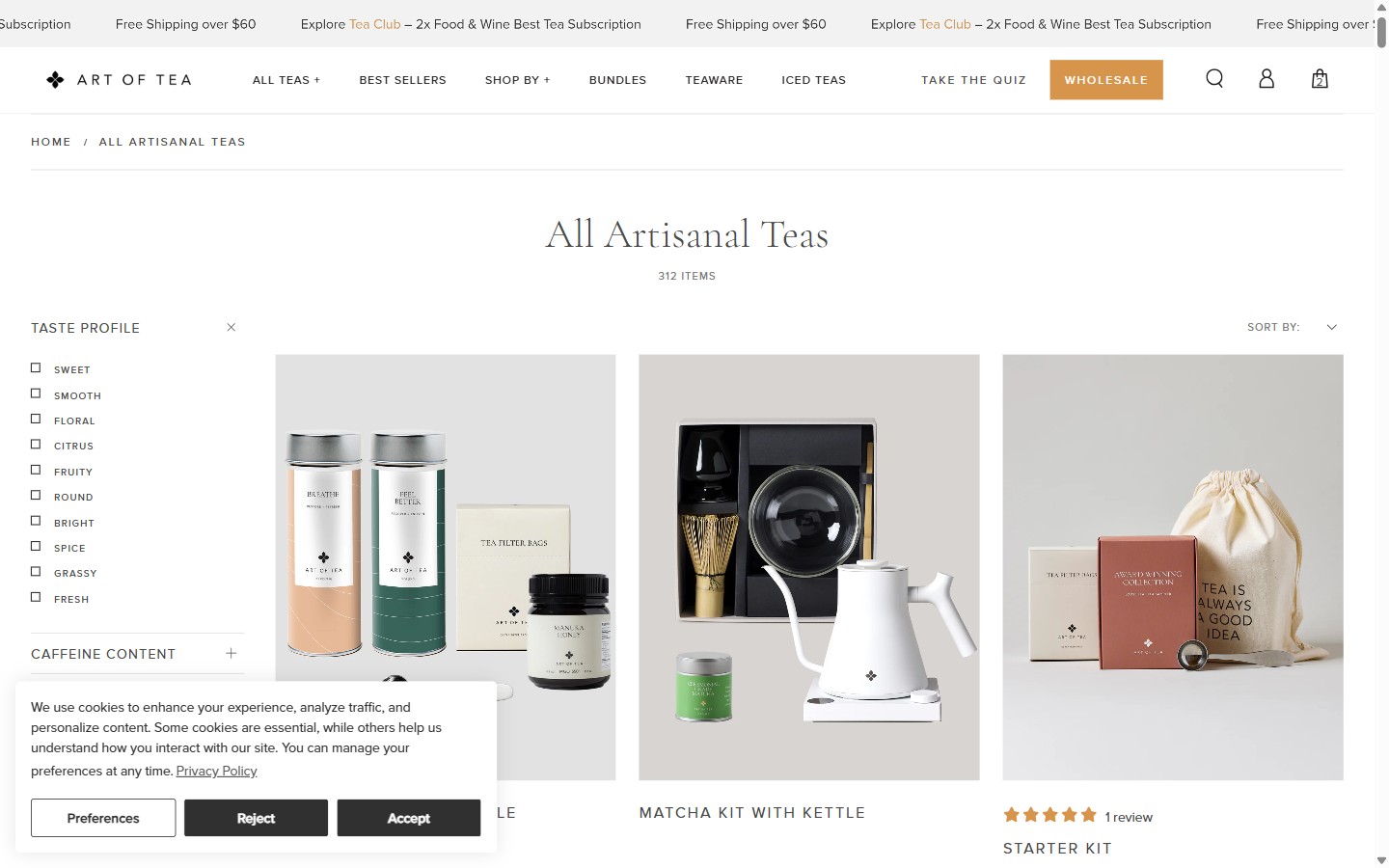
- All collection pages (Shop All, Caffeine-Free Blooms, Green Tea Blooms) display products in a fixed grid with no filter bar, no sort dropdown, and no way to narrow results by price, benefit, or product type.
- A shopper looking for 'the cheapest option' or 'something for energy' must scroll through every product card with no ability to narrow the list — particularly friction-heavy on the Shop All page where the catalog spans teas, glassware, and gift sets.
- This is a Standard pattern present on 9/10 benchmark wellness stores; its absence places The Qi below the baseline expectation for the premium DTC category.
- Implement Shopify's native faceted filtering with at minimum: Price Range, Benefit/Goal (Energy, Beauty, Calm), Caffeine Level (Caffeinated, Caffeine-Free), and Bestsellers/New.
- Add a persistent Sort dropdown (Most Popular, Price Low-High, Newest) as the minimum viable improvement if full filtering is not immediately resourced.
- On mobile, use a bottom-sheet filter drawer triggered by a fixed 'Filter & Sort' pill at the bottom of the viewport so users can refine at any scroll depth.
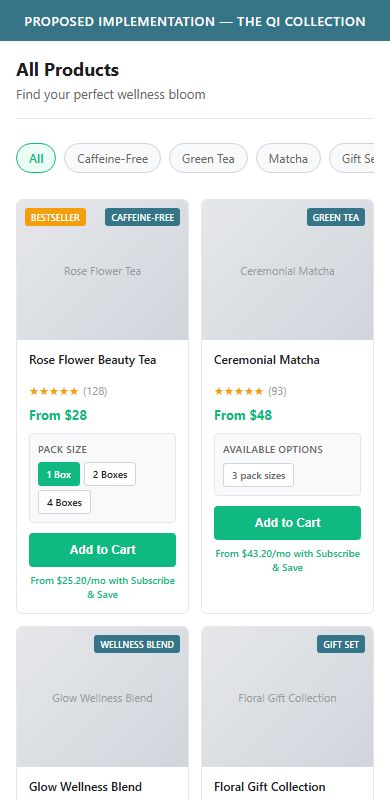
- Product cards display only one image, the product name, star rating, review count, and 'FROM $X' price — with no indicator of how many variants exist, what flavors or sizes are available, or which is the bestseller variant.
- Shoppers who want to compare options (e.g., single-flower vs. variety box) must click into each PDP individually, increasing browse friction and reducing the probability of adding to cart.
- 6 of 10 benchmark stores show at least a 'From $X / X variants' label or a small pack-size selector on collection cards to set expectations before the PDP click.
- Add a 'X variants' text label or small pack-size pills (e.g., '1 Box / 2 Boxes / 4 Boxes') directly on product cards to surface the bundle options without requiring a PDP visit.
- Where product type icons (Caffeine-Free, Green Tea, Matcha) differ between items, display a small icon badge on the card image corner to aid at-a-glance filtering.
- Test showing the subscription price alongside the retail price on cards ('From $32.40/mo with Subscribe & Save') to surface the subscription value proposition earlier in the funnel.
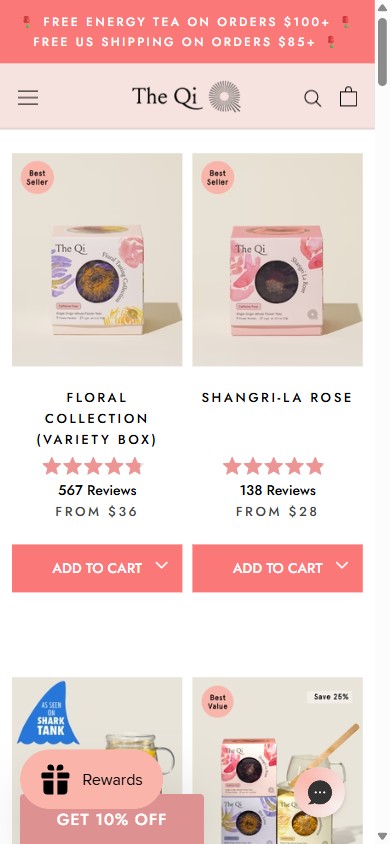
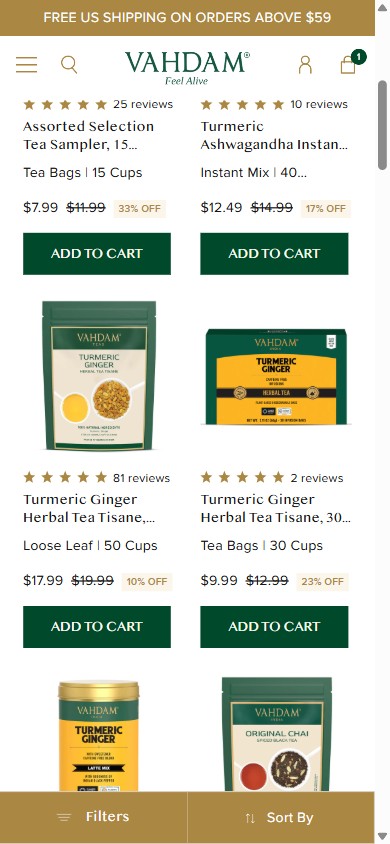
- Even if filters are added, without a sticky filter/sort bar, mobile users who scroll past the first fold lose access to sort controls and must scroll all the way back to the top to change their view.
- This is a dependent finding on cp_f1 — if filters are implemented, sticky positioning should be part of the implementation spec from day one.
- 6 of 10 benchmark stores use a fixed bottom-bar 'Filter & Sort' button on mobile that persists throughout the scroll — the pattern adds ~1 day of development effort but significantly reduces pogostick behavior.
- Implement a fixed bottom pill ('Filter & Sort') that opens a bottom-sheet drawer on mobile — this is the Shopify Dawn/Prestige theme's built-in pattern and can be enabled with a theme setting.
- Ensure the sticky bar appears only after the user has scrolled past the collection header (so it doesn't compete with the announcement bar) and fades in smoothly.
- Pair with the filter implementation (cp_f1) so both are released together — the sticky bar adds no value without filters to select.
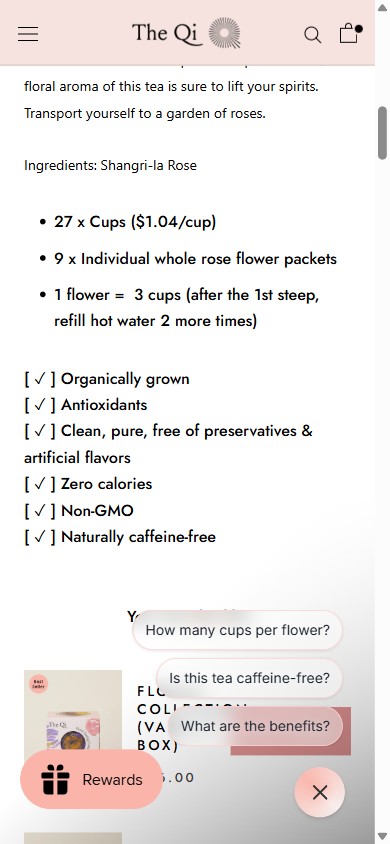
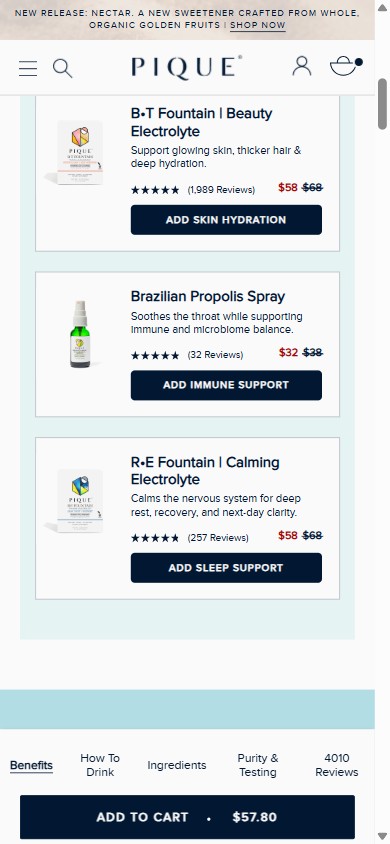
- After scrolling past the Add to Cart button on mobile (approximately 900px down), the ATC button is completely gone from the viewport with no sticky bar replacing it — confirmed on both the Floral Collection and Rose Flower Beauty Tea PDPs.
- The PDP is long — 12,970px on the Floral Collection — containing rich content sections, cross-sells, and 567 reviews. Shoppers reading this content have no way to add to cart without scrolling back to the top.
- This is the most universally impactful mobile CRO fix for Shopify stores; 8 of 10 benchmark wellness brands use a sticky ATC bar, and it is the single highest-leverage implementation for a store with The Qi's content-rich PDPs.
- Implement a sticky ATC bar that appears at the bottom of the mobile viewport whenever the inline ATC button is scrolled out of view — it should show the product name, selected variant, price, and the ATC button.
- The Prestige theme (The Qi's current theme) supports a sticky ATC bar via theme settings — this can be enabled without custom development as a first step.
- Include the Subscribe & Save toggle in the sticky bar so shoppers can switch between one-time and subscription purchase without scrolling back up.
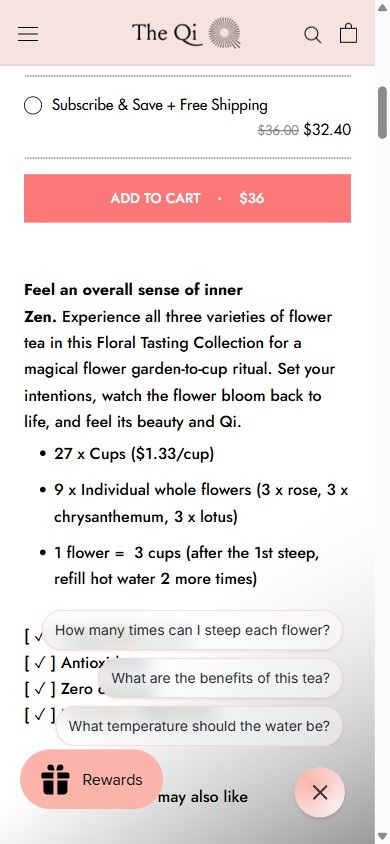
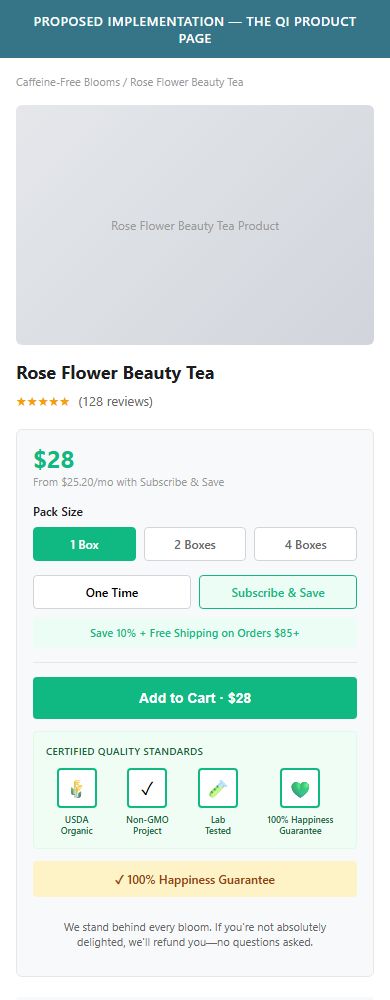
- The ATC zone contains the product price, quantity bundle selector, subscribe/one-time toggle, and the ATC button — but zero visual certification or trust badges (USDA Organic, Non-GMO, GMP Certified, etc.).
- Certification claims exist only as text checkmarks in the product description below the fold: '[ ✓ ] Organically grown', '[ ✓ ] Non-GMO' — these are invisible to shoppers who decide to purchase without reading the full description.
- 8 of 10 benchmark wellness stores display at least 2 visual certification badges within the ATC zone; for a premium brand priced at $28-$119, these badges directly counter the 'is this worth it?' hesitation moment.
- Add a horizontal row of 3-4 certification badge icons (using official artwork from USDA, Non-GMO Project, etc.) directly below the ATC button — this is the highest-visibility placement in the purchase decision zone.
- Include a 'Satisfaction Guarantee' icon or '100% Happiness Guarantee' badge alongside certifications to reinforce the risk-reversal signal at the moment of commitment.
- For certifications not yet earned, display quality promise badges ('Single-Origin', 'Hand-Harvested', 'Third-Party Lab Tested') with a tooltip linking to the lab report.
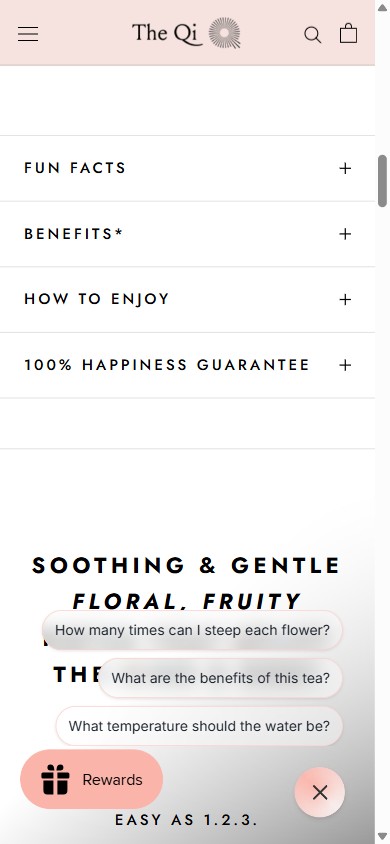
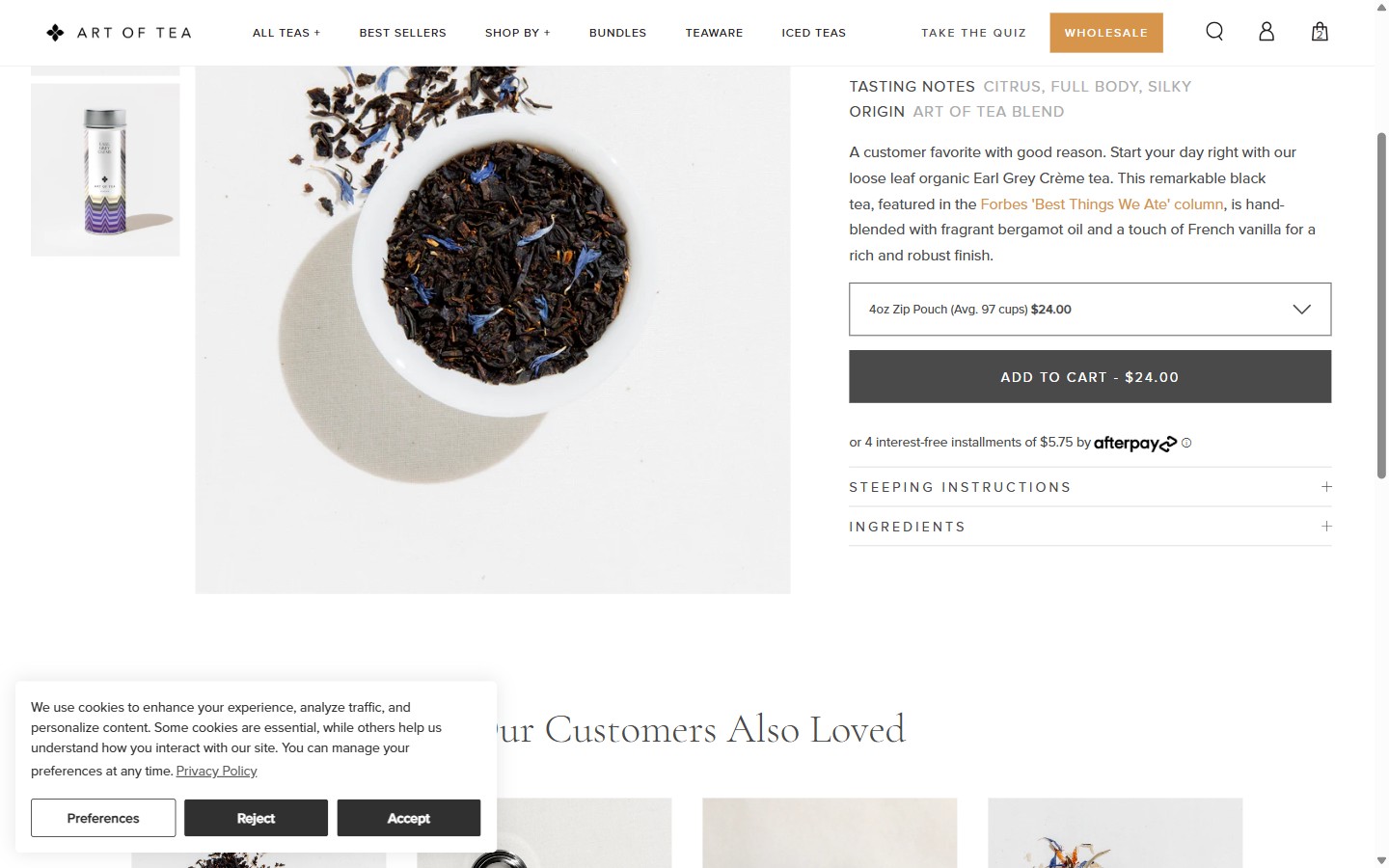
- The PDP accordion sections are: Fun Facts, Benefits*, How to Enjoy, and 100% Happiness Guarantee — none of which contains a structured ingredient list, supplement facts panel, or sourcing transparency block.
- Ingredient information appears only as a single inline text line in the description ('Ingredients: Shangri-la Rose') without quantity, sourcing origin, or preparation notes — far below the standard for a premium wellness brand.
- 9 of 10 benchmark wellness brands show a structured ingredient display (list format, table, or icon grid) — for flower tea, this would include the flower variety, origin farm, caffeine content, and tasting notes in a scannable format.
- Add a dedicated 'Ingredients & Sourcing' accordion section with: flower name, origin country/farm, caffeine level, flavor profile, and any processing notes (single-origin, handpicked, etc.).
- For multi-flower products (Floral Collection), display each flower as a separate row with its individual properties — this reinforces the premium, curated positioning.
- Include a 'Why This Flower?' callout beneath each ingredient explaining the specific wellness benefit (e.g., 'Blue Lotus — calming, promotes restful sleep') to bridge ingredient transparency with benefit communication.
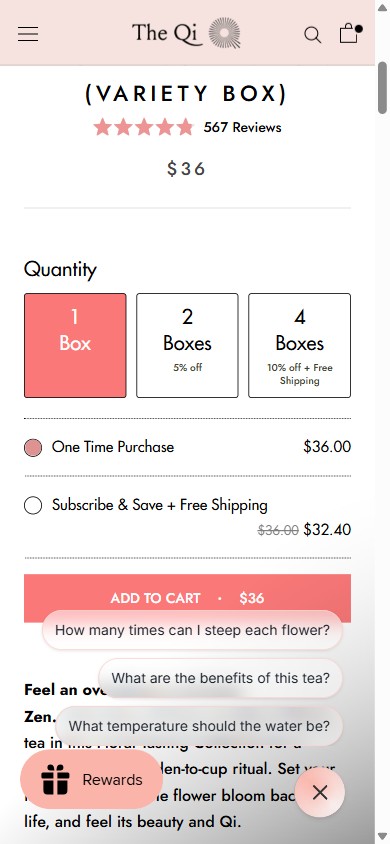
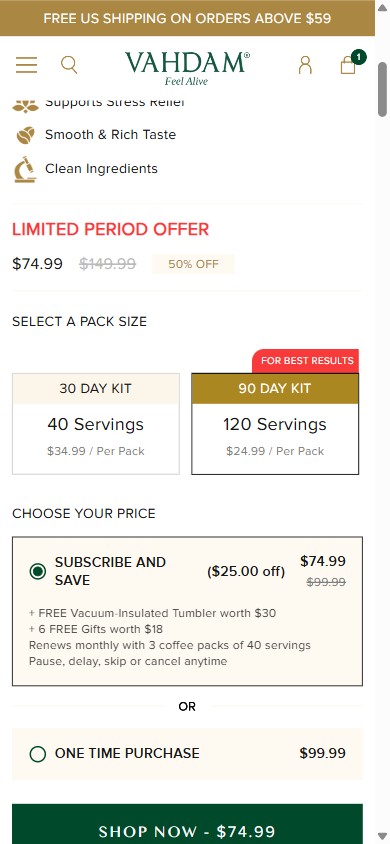
- The PDP displays a clear 'One Time Purchase' / 'Subscribe & Save + Free Shipping' toggle — but 'One Time Purchase' is pre-selected (filled radio button) with 'Subscribe & Save' unselected by default.
- Anchoring the default selection to subscription is the most effective lever for recurring revenue in consumable wellness; the savings ($36 → $32.40, 10% off + Free Shipping) are compelling but invisible to shoppers who never click the subscribe option.
- 5 of 5 leading US wellness stores with subscription programs pre-select the subscription tier — some explicitly label it 'Most Popular' or 'Best Value' to reduce the perceived commitment.
- Switch the default selection to 'Subscribe & Save + Free Shipping' and label it with a 'Most Popular' or 'Best Value' badge to anchor shopper expectations toward the subscription option.
- Add a brief reassurance note beneath the subscription option: 'Pause or cancel anytime — no commitment' to address the #1 objection to subscribing.
- Consider adding a savings callout: 'You save $3.60 per order + free shipping = $25+ saved/year' to make the subscription value proposition concrete and compelling.
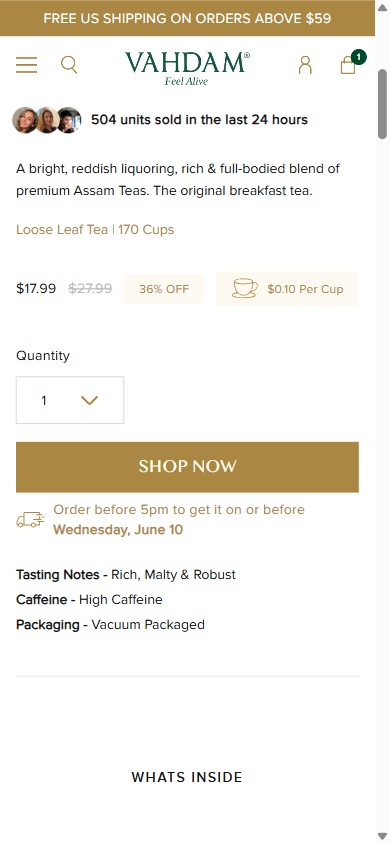
- The PDP ATC area contains the quantity selector, subscription toggle, and ATC button — but no mention of when the order will ship, when it will arrive, or whether expedited shipping is available.
- Shoppers buying as gifts (a significant segment for The Qi given the gift set catalog and 'Add a Gift Message' feature) have no way to determine if the product will arrive in time without navigating to a separate shipping policy page.
- 6 of 10 benchmark stores display at least a static delivery estimate on PDP ('Usually ships in 1-2 business days' or 'Order by 2pm EST for same-day dispatch').
- Add a static shipping callout beneath the ATC button: 'Usually ships within 1-2 business days | Free shipping on orders $85+' to set clear expectations and reinforce the free shipping incentive.
- For gift-heavy periods (holidays, Valentine's Day, Mother's Day), dynamically show 'Order by [date] for delivery before [holiday]' to capture time-sensitive gifting intent.
- Consider adding a 'Delivered in 3-5 business days (US)' estimate with a link to the full shipping policy for shoppers who need more detail.
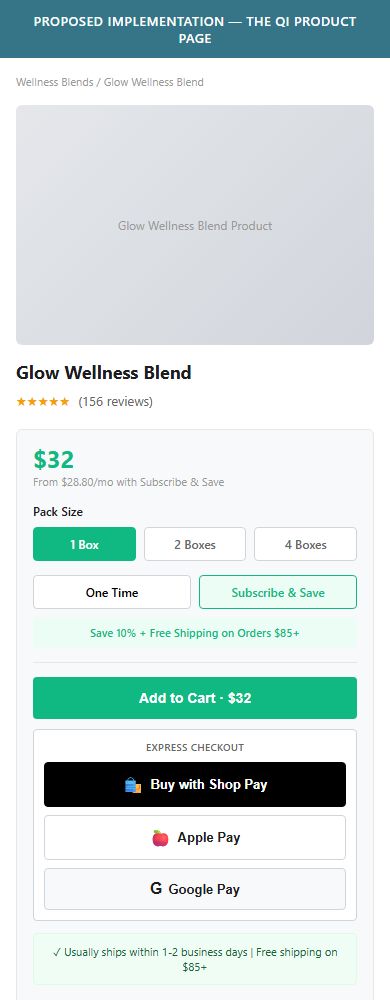
- The PDP has a single 'ADD TO CART · $36' button with no 'Buy Now' option to bypass the cart — confirmed on both the Floral Collection and Rose Tea PDPs.
- While Shop Pay is available on the homepage Shark Tank product widget, it is not surfaced on regular PDPs, meaning high-intent shoppers who know exactly what they want must still go through the cart page.
- Shop Pay (already installed) can be surfaced as a 'Buy with Shop' button directly on PDPs with zero development cost — this enables one-click checkout for returning Shop Pay users.
- Enable the Shop Pay 'Buy with' button on PDPs using Shopify's built-in dynamic checkout button feature — this is a single theme settings toggle in the Prestige theme.
- Position the Shop Pay button directly below the ATC button with a subtle 'or' divider to maintain clear visual hierarchy.
- Test showing Apple Pay / Google Pay buttons alongside Shop Pay for the segment of mobile users on Safari/Chrome who have these wallets configured.
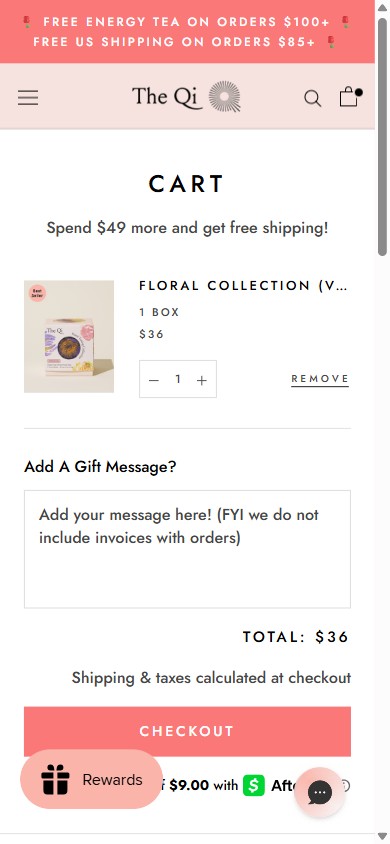
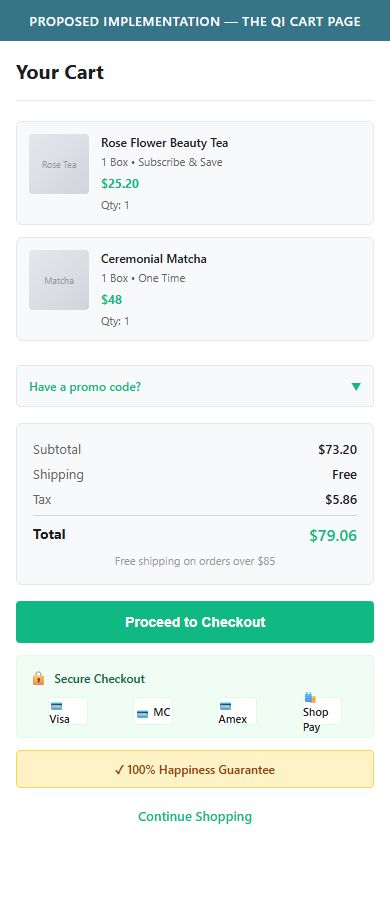
- The cart page and cart drawer both show the CHECKOUT button with only 'Shipping & taxes calculated at checkout' below — no payment method icons, no security badge, and no guarantee messaging within the checkout CTA zone.
- At the cart stage, shoppers have already made the decision to buy but have not yet committed payment information — this is the moment where 'is this site secure?' anxiety peaks, and a trust row directly beneath the button directly addresses it.
- 8 of 10 benchmark wellness stores display at least payment method icons (Visa, Mastercard, Amex, Shop Pay) and a lock-icon 'Secure Checkout' message within 100px of the checkout button.
- Add a row of accepted payment method icons (Visa, Mastercard, Amex, Discover, Shop Pay, Afterpay) immediately below the CHECKOUT button in both the cart drawer and the /cart page.
- Include a 'Secure Checkout' line with a lock icon and a '100% Happiness Guarantee' reminder to reinforce the brand's own money-back promise at the highest-anxiety moment.
- Afterpay is already integrated — surface 'Pay in 4 interest-free installments' as a cart-level reminder (currently only visible as 'Make 4 interest-free payments' on PDP) to reduce price hesitation on $85+ orders.
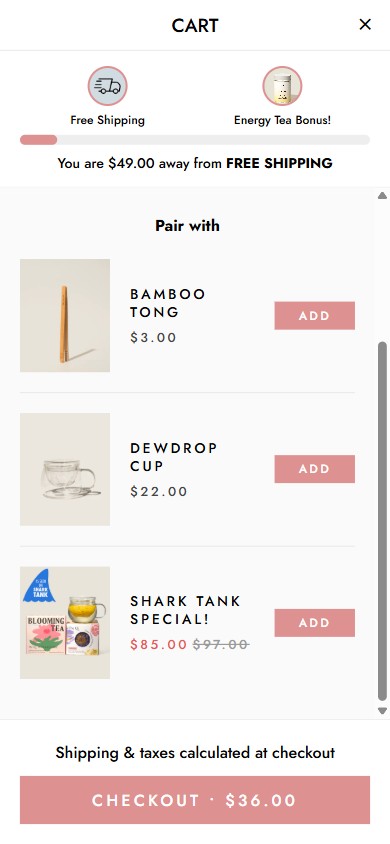
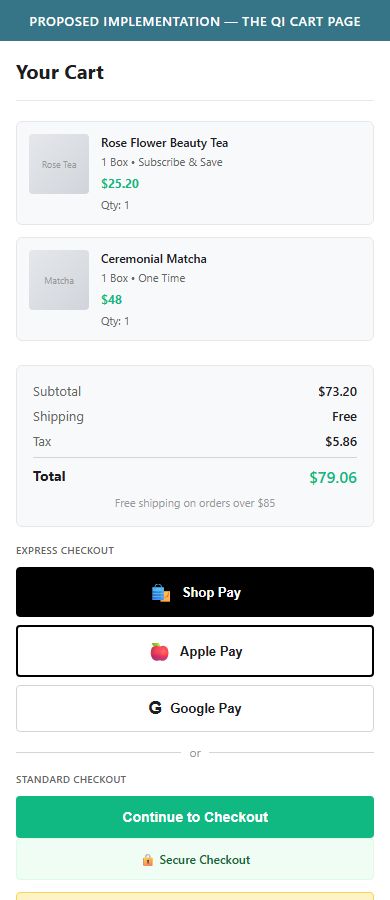
- Both the cart drawer and the /cart page show a single 'CHECKOUT · $36' button with no Shop Pay, Apple Pay, Google Pay, or PayPal express checkout alternatives.
- Shop Pay is installed (confirmed via script detection and visible on the homepage Shark Tank product widget) but not exposed in the cart — this is a missed opportunity for the ~30-40% of Shopify shoppers who use Shop Pay.
- Express checkout buttons eliminate the multi-field checkout form for returning customers, which is the #1 friction point in Shopify's funnel and typically yields a 10-20% lift in checkout completion rates.
- Enable Shopify's dynamic checkout buttons in the cart (both drawer and /cart page) to surface Shop Pay, Apple Pay, and Google Pay above or alongside the standard CHECKOUT button.
- Label the express options clearly: 'Express Checkout' above the dynamic buttons and 'Standard Checkout' below, so the choice is clear rather than competing.
- Verify that enabling cart dynamic buttons is compatible with the current Rebuy cart drawer — test on a development theme before releasing to production.
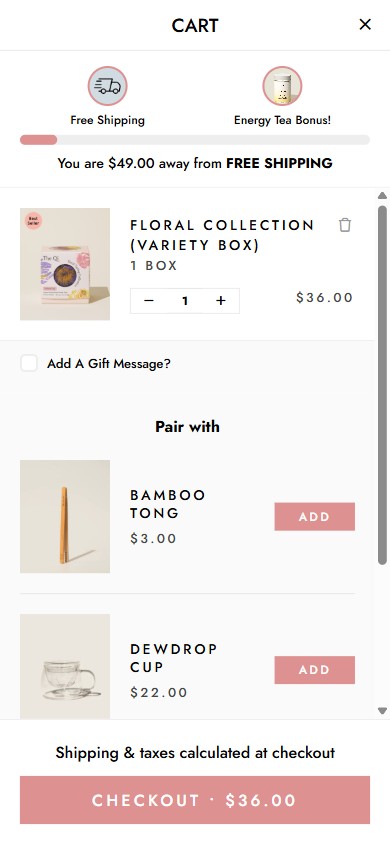
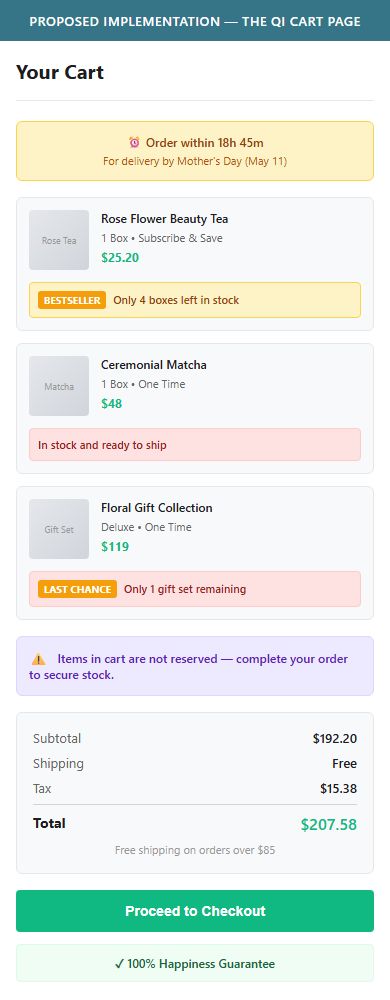
- The cart drawer and /cart page contain no urgency signals: no stock countdown ('Only 3 boxes left'), no dispatch timer ('Order within 2h for same-day dispatch'), and no cart reservation message.
- The Qi's catalog includes limited-edition and Shark Tank Special bundles that are natural candidates for scarcity messaging — 'Last Chance' is already used on collection cards but this signal does not carry into the cart.
- Urgency triggers are particularly effective for gift-oriented purchases and for shoppers who have multiple browser tabs open comparing options — a time-bounded reason to complete purchase now reduces this abandonment vector.
- For items already labeled 'Last Chance' or 'Best Seller' on collection pages, surface a 'Low stock — only X remaining' line item in the cart using Shopify's inventory count metafields.
- Add a 'Order in the next Xh Xm for delivery by [date]' dispatch countdown using a Shopify app (ETA Date or similar) — especially relevant for the gift set catalog.
- At minimum, add a static 'Items in cart are not reserved — complete your order to secure stock' message beneath the cart items to create mild urgency without false scarcity.
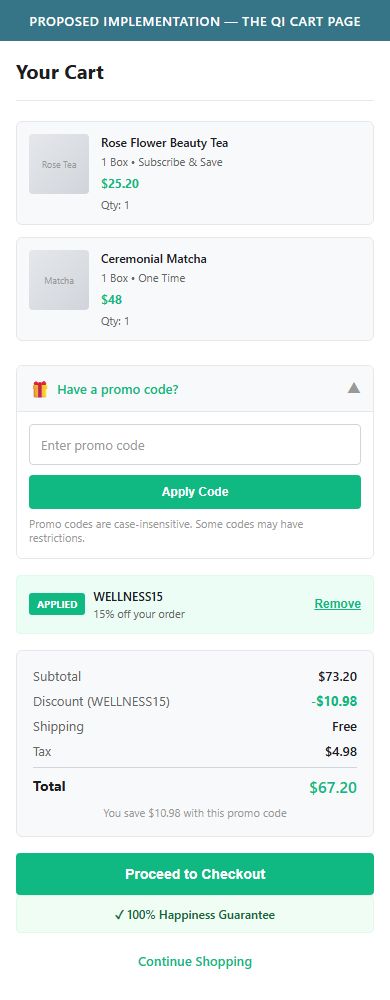
- Neither the cart drawer nor the /cart page contains a coupon code input field — shoppers who arrive via email campaigns or influencer codes with a promo code have no way to apply it until they reach the Shopify checkout form.
- The cart page's gift message textarea occupies the space where a coupon field would conventionally appear, creating an implicit signal that no coupon entry exists pre-checkout.
- While Shopify's native checkout does have a coupon field, pushing shoppers to discover it only at checkout — after they've already committed — risks abandonment if the code doesn't work as expected.
- Add a collapsed 'Have a promo code?' disclosure link in the cart that expands to reveal a code input field — the collapsed default prevents the 'leave to search for codes' behavior while still serving promo traffic.
- Position the coupon field above the order total summary so it appears as part of the price calculation flow, not as an afterthought.
- For email-driven traffic, consider auto-applying codes via URL parameter (?discount=CODE) so the coupon appears pre-applied in the cart — eliminating the field entirely for that segment.
App Ecosystem
What's installed vs what's missing from best-in-class Health & Wellness stores
Present (13)
Missing (5)
App Stack Assessment
The Qi has a well-curated app stack for a DTC wellness brand at this stage. Standouts include Rebuy (smart upsell/cross-sell in cart and PDP), Okendo (strong UGC review platform), Smile.io (loyalty program reducing acquisition cost), and Klaviyo (email automation). The most critical missing piece is a subscription management platform — without Recharge, Appstle, or Loop, the Subscribe & Save option visible on PDPs has no back-end subscriber management portal, limiting its effectiveness for long-term LTV growth. The Revenue Hunt quiz app is installed but underutilized — surfacing it prominently on the homepage is a no-cost opportunity to lift new visitor conversion. Gorgias chat is well-intentioned but the FAQ overlay fires over PDP content, which needs a configuration fix.
Confidential — Prepared for The Qi by Growisto | June 2026